What is Varco?
Varco is remote access made simple. It gives your team a consistent way to reach devices, services, and fleets across organizations—without stitching together ad-hoc VPNs, jump hosts, and one-off scripts.
Think of Varco as a Swiss-army knife for remote fleet management: provisioning, tunnels, device groups, users, reporting, and optional tools (such as actions and Debug AI) brought together in one place.
How the pieces fit together
Varco is built from a few cooperating parts: devices where agents run, a Varco edge that terminates secure traffic, the Varco Manager web portal for administration, and the Varco client GUI when you need flexible TCP/UDP access from a desktop.
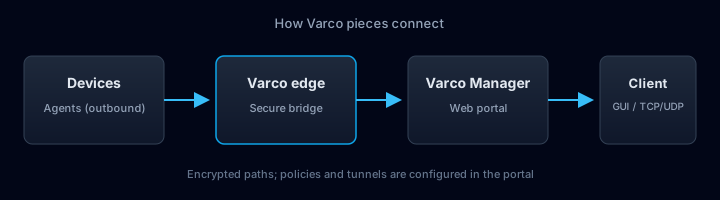
- Devices run a Varco agent and connect outbound to the edge.
- The edge bridges encrypted traffic between your operators and your devices.
- Varco Manager is where you configure users, roles, tunnels, groups, and policies.
- The client GUI complements the portal for arbitrary TCP and UDP tunnels from your workstation.
From device to edge: HTTPS, no inbound NAT rules
Devices initiate a secure HTTPS connection toward the Varco edge. Because traffic is outbound from the device, you typically do not need custom NAT mappings or firewall holes on the device side for Varco to work—similar to how managed agents “phone home” over TLS.
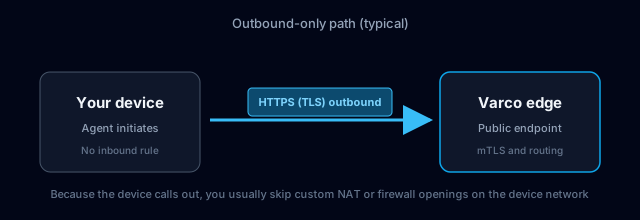
Your exact network policy may still require allowlists; the point is Varco does not depend on you opening inbound ports to each device.
Portal and Easyconnect HTTP tunnels
In Varco Manager, you create and manage HTTP/HTTPS tunnels (often referred to as Easyconnect in the product). The proxy forwards HTTP traffic through the secure path so web apps and APIs on the device side are reachable without exposing the device directly to the internet. Advanced options (host rewrite, WebSocket, LAN rewriting) are available in the tunnel form when you need them.
TCP and UDP with the Varco client GUI
For arbitrary TCP or UDP—databases, custom protocols, or non-HTTP services—use the Varco client GUI (desktop app) to create tunnels in addition to what you configure in the portal. The portal focuses on fleet management and HTTP-style access; the GUI extends that to general-purpose port forwarding.
Who this guide is for
- Operators who manage remote devices day to day
- Team leads who set up access and onboarding
- Anyone who needs a clear path through the portal interface
How to use this site
- Use the search box in the left column to find topics across all articles (type at least two characters).
- Browse articles by section when you are exploring a new area.
- Use In this page on the right to jump between headings on long guides.
- Your browser Back and Forward buttons work with documentation history.
- The build line under the page title shows the same version, commit, and build time as the footer of the main portal sidebar (from the current deployment).
What you will find
- Step-by-step workflows such as onboarding users and devices
- Deep dives on HTTP/HTTPS tunnels and device group protection
- Reporting and Debug AI where your organization enables those features
- Product updates in the Changelog and planned work in the Roadmap
Main areas
- Basics — Overview and portal navigation
- Operations — Users, devices, tunnels, groups, reports, and tools
- Updates — Changelog and roadmap